Sunday, October 19, 2008

The Excitement in my Life


This is Will, my stepson, and me. We drove down to South Carolina on Wednesday. Thursday, we went to Parris Island for Family Day and Friday for the graduation. We had a nice lunch with Will and then drove back up to VA on Friday. His mother had plans for him and she had not thought about including us in those plans. Will is going to see us next weekend, when we go to Disney. Oorah!

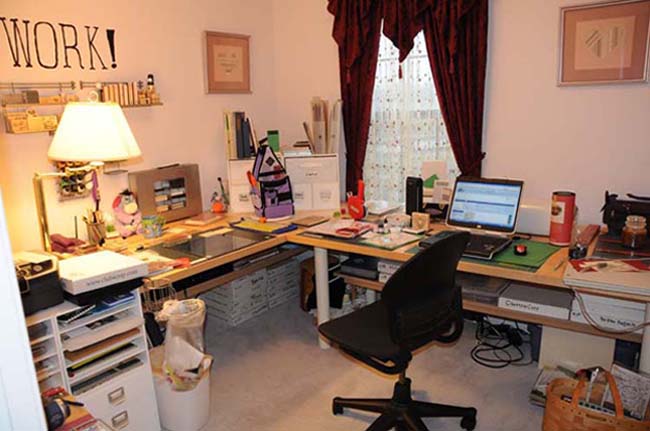
I'm in my studio, printing photos. I was out of photo paper and had planned to get more, but with the trip, hadn't made it out to Costco.

I had thought that with an adult lifestyle, meaning no young children in the house, I wouldn't have so many photos that I couldn't keep up with my scrapbooking. Hah! What with trips to Disney, Marine Corps graduations and life in general, I've got more than enough photos to keep me busy.


Monday, October 13, 2008

S*U*C*C*E*S*S

That's the way you spell success! The three day crop was nowhere near a fail. I did a fail at planning what to bring. I just couldn't decide and threw a bunch of things into several bags and headed out the door. When I got to the crop, I had no adhesive gun. But I did have my laptop. I ended up doing all three days as a digital crop and I do NOT regret it!

I took most of the bags of stuff home the first night. I didn't want to haul them back and forth, so I didn't. I took even more extra stuff home the second day. By the time the third day came to a close, I really didn't have a lot to drag out to the truck. Yay!

Sunday morning, I got up and downloaded a few more files, so I could finish off layouts that I'd started and not had the elements to finish. I don't try to work fast at a crop, so getting 14 pages done was just fine with me. I probably could have gotten more pages done if I had really buckled down, but I wasn't in the mood to buckle down and go into hyperfocus. I wanted to be able to enjoy working on pages and talking with folks.

Will I go digital for other crops? You bet! I love the idea of not having a lot of stuff to carry into the building. I don't really like trying to pack up half of my crop space and take it along. Digital works.

Thursday, October 9, 2008

Found It!

Sometimes, I swear, I need to wait about two hours before I post anything. Yep, that's about how long it took me to find a digital scrapping tutorial page with actual information on it beyond 'How to Re-color an Element.' It is the Digital Scrapbook Place Tutorial Page. I found information on a couple of things that I wanted to learn and a few more that I didn't realize I needed to learn. The tutorials are even interlinked, so if one references something that is covered in another tutorial, you can hop right over and get caught up.

No, it isn't the ultimate resource for digital scrapbookers. I don't think that exists. But it is pretty darned good.

What I Need to Know

There is a convention happening in Salt Lake City this weekend for digital scrappers. I wanted to go at first, then I looked at the schedule of classes. The things that I want to learn are not going to be covered. I don't need to learn how to use a sketch or how to create a color set. I don't need to learn how to organize my files, how to get published in a magazine or how to photograph everyday events.

I want to learn how to wrinkle or curl a ribbon, in some way that doesn't require a plug-in or a template that I must purchase and download. I want to learn how to use my rulers and grids more effectively. I'd like to know how to mask more efficiently. I want to learn how to create a path that does not use a lasso or magic wand. There are probably a lot of other things that I'd like to learn how to do, but I don't even know about them right now. I'm such a beginner that i don't know what I need to learn. I do know what I have already learned and what I keep seeing over and over again.

There are lots and lots of free tutorials out there. The majority of them cover the same things. Re-coloring an element. Combining two pieces of paper to make a third. Changing the color of an element. How to use templates. How to color an element to match your paper. How to install a brush. How to re-color multiple elements. And so on. If I'm looking for a tutorial on how to get text to line up on a curved path, I've got to go to a Photoshop guru and look at a video. The digital scrapbooking sites won't get into things like that for free.

Now I get why the digital scrapbooking gurus have their followings. There aren't any digital scrappers who have free tutorials beyond the basics. But those tutorials are out there. They are on the Photoshop sites.

Tuesday, October 7, 2008

Current Project Excitement

I'm currently working on a digital calendar. I'm using Ztampf! elements and papers for it. I don't have enough of any other designer to complete 24 different layouts in pairs. It is a BLAST! I'm making a date page and a photo page for each month, trying to use a similar theme and style for each month. I'm having a lot of fun putting the papers together, adding the embellishments and creating layouts that are going to look spectacular when I get them printed out.

I'm going to make myself take paper projects to the crop this weekend and I might even work on them. When I get tired of working on paper projects, I'm going to put the paper away and pull out the pixels. The one thing that I'm going to miss at the crop would be my second monitor. That's such a sweet setup. Otherwise, all I need is my laptop, my EHD and my mouse. And a source of power. Which means I'll have to pack an extension cord and a surge suppressor. Hah. It all will fit in a single, cute basket that I already own. No huge tote, no lugging bags and boxes and bins. One basket.

Monday, October 6, 2008

Hold Everything!!!

I was able to contact Miki and she immediately corrected the issue with the wrapping wires and sent me a corrected copy!

We have an addition to the favorite designer list!!! She doesn't have a website of her own, but you can find her designs at Scrapbook-Elements under Miki Ferkul. They have a sort by designer option, so that's what I suggest you use to find all of her kits.

Close, but not Quite

I've been looking at the latest kits available for digital scrapping from many different designers and companies. This preview site shows quite a lot in an easy to scan through format. I thought I'd found a designer that I could add to my list of favorites, which is currently one designer long. Miki Ferkul of MicroFerk Designs looked promising. I purchased, downloaded, and unzipped her 'Rugged Wraps I' and 'Rugged Wraps II' kits.

Drat. When I went to put a wrapping of wires and clips onto one of my photos, the darned thing would not line up. The edges need to be lined up exactly with the layer below them. If they are overlapping, it will look like wires are coming through the item, not around the item. If they don't touch, the illusion of wrapping is lost. I zoomed in and realized that she'd created the wrap skewed. Miki didn't create her edges in a straight line perpendicular to the baseline of a layout. It is impossible to line up the entire wrap. One part or another is either hanging out in space or poking through the layer below. The entire wrap won't line up.

I'll have to tweak the wrap file to get the edges to line up correctly. That is annoying and I would rather not have to do it. Once I get them lined up straight, I'll save them that way so I don't have to do it a second time. But having to correct something that I think should be precise and already correct keeps Miki out of my favorites list. It's only three or four pixels wrong. But there are times when three or four pixels are important and this is one of them.