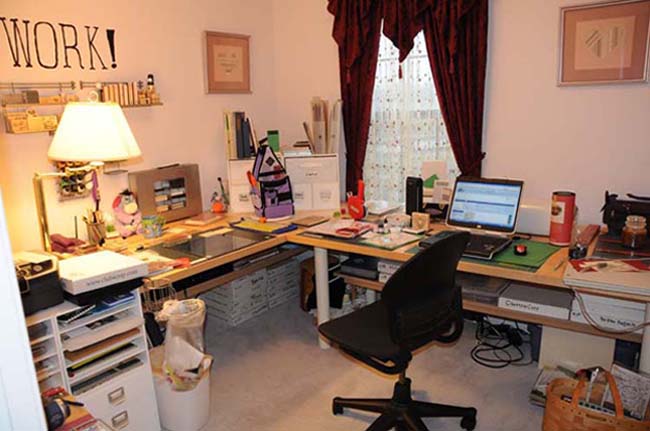
I have a few layouts that I always said I'd get back to later and then I never did. Everyone has some of these. Ones that need journaling, or additional embellishment. Just something that you weren't in the mood to deal with at that moment and you set them aside for later, when you felt like working on them.
I have decreed that it is 'later' right now.
Two down and a small stack left to go. When these are done, I have even used my 50% off coupons and gotten a new album to put layouts in. I'm tired of putting them into boxes to deal with later. I want them all done, now.
Friday, December 12, 2008

Sunday, December 7, 2008
Not Shopping
I was at my LSS yesterday and I wandered around a lot, looking at things. She's a Mrs. Grossman's outlet, so she carries a lot of stickers. I don't scrap with stickers very often. Anyway, I was looking for a particular set of stickers, a set of dates for a calendar year, that you can use when you are making your own calendars. She didn't have any. I left without getting anything.
I didn't buy anything at all? Yep. It's happening more and more. I'm working on using up my paper stash. I haven't printed out many photos recently to put onto the paper that I have. I have plenty of supplies to create paper layouts and I don't feel like buying any more. Nothing really strikes me as being something that I must have.
I went on-line and found the stickers. I don't want to pay shipping for a single sheet of stickers. I've got a lot of number stamps. I guess I'll use those on the calendar, instead.
I didn't buy anything at all? Yep. It's happening more and more. I'm working on using up my paper stash. I haven't printed out many photos recently to put onto the paper that I have. I have plenty of supplies to create paper layouts and I don't feel like buying any more. Nothing really strikes me as being something that I must have.
I went on-line and found the stickers. I don't want to pay shipping for a single sheet of stickers. I've got a lot of number stamps. I guess I'll use those on the calendar, instead.
Saturday, December 6, 2008
It Isn't A Sketch
Though I can almost understand why she might think so. A lady at last night's crop looked through my Page Maps deck of ideas, from Becky's book and was thrilled. Not so thrilled that she could put them back in order, but still, thrilled. She'll probably toddle out and get a set of her own. Then she looked at a completed digital layout and asked what would I do with it. I talked about printing them out and having books created. She still thought that the completed layout was a sketch for something that I would then re-create in paper. No. Why create in digital at a quality I can print out in and then do all the work a second time in paper?
Some folks simply do not understand that the digital world is a real world. While it is not objects you can touch, it is information. Information about products you can purchase, for example. You see information in to form of pictures and words about objects. You send information about your credit card. Based on the information you have sent, the company can then take action, get your money and send you the product you purchased.
Digital scrapping is the same. It is visual information in the form of layouts. You look at them. You enjoy what you look at. Even though you are not turning pages, you are still looking at an album.
Some folks simply do not understand that the digital world is a real world. While it is not objects you can touch, it is information. Information about products you can purchase, for example. You see information in to form of pictures and words about objects. You send information about your credit card. Based on the information you have sent, the company can then take action, get your money and send you the product you purchased.
Digital scrapping is the same. It is visual information in the form of layouts. You look at them. You enjoy what you look at. Even though you are not turning pages, you are still looking at an album.
Thursday, December 4, 2008
Stamping on Watercolor Paper
I got a 10.5" x 14.5" sampler pad of Strathmore watercolor paper. It contains two different types of 140 lb. cold press paper, two different types of 140 lb. rough paper, one 140 lb. hot press paper, and one 80 lb. cold press paper. I got two sheets of each 140 lb. paper and three sheets of the 80 lb. paper. So far, I've tried the hot press paper and the 80 lb. paper.
The hot press paper is my favorite watercolor paper for stamping. The watercolor paper available at the average craft store is cold press. If you go to the artist supply shops, you can find hot press paper. I strongly suggest that you do so! It's wonderful stuff. It is smooth, so your stamps come out better. With 140 lb paper, I don't have a lot of trouble with bleeding, either. Whatever technique I use to add color seems to work better with the hot press and I've tried Copics, watercolor pencils and markers.
The 80 lb cold press paper has every problem I've ever heard about for stamping on watercolor paper. It was rougher, so some of the details of a delicate stamp didn't show well. It also bled very easily, so a bold stamp with a good amount of ink would have blurry edges. Adding color to this paper is harder. I had bleeding with watercolor pencils, Copics and with markers. I felt like I didn't know what I was doing anymore. Often, it looked like I'd tried too hard to erase and had worn out the paper, when I was just doing a light circular blending stroke with my brush that would be fine on a more robust paper. This paper was a fail. I've still got two sheets of this paper left and I'll cut one up for samples and probably throw the remaining sheet out. I hate it that much.
I don't hold out a lot of hopes for the rough paper, but I'll give it a shot. The cold press paper is the same as the other cold press paper I've used in the past. I don't expect it to be a learning experience.
Light weight paper in cold press is nasty. Do not bother trying to save money by getting lighter weight watercolor paper. You might save pennies, but it will cost you results.
The hot press paper is my favorite watercolor paper for stamping. The watercolor paper available at the average craft store is cold press. If you go to the artist supply shops, you can find hot press paper. I strongly suggest that you do so! It's wonderful stuff. It is smooth, so your stamps come out better. With 140 lb paper, I don't have a lot of trouble with bleeding, either. Whatever technique I use to add color seems to work better with the hot press and I've tried Copics, watercolor pencils and markers.
The 80 lb cold press paper has every problem I've ever heard about for stamping on watercolor paper. It was rougher, so some of the details of a delicate stamp didn't show well. It also bled very easily, so a bold stamp with a good amount of ink would have blurry edges. Adding color to this paper is harder. I had bleeding with watercolor pencils, Copics and with markers. I felt like I didn't know what I was doing anymore. Often, it looked like I'd tried too hard to erase and had worn out the paper, when I was just doing a light circular blending stroke with my brush that would be fine on a more robust paper. This paper was a fail. I've still got two sheets of this paper left and I'll cut one up for samples and probably throw the remaining sheet out. I hate it that much.
I don't hold out a lot of hopes for the rough paper, but I'll give it a shot. The cold press paper is the same as the other cold press paper I've used in the past. I don't expect it to be a learning experience.
Light weight paper in cold press is nasty. Do not bother trying to save money by getting lighter weight watercolor paper. You might save pennies, but it will cost you results.
Wednesday, December 3, 2008
Why I'm not Posting Pics
I do most of my digital layouts with elements and paper from Ztampf! I have read her TOU (Terms of Use) and unless I reduce the ppi by a lot more than I am usually willing to, I may not post things using her paper and elements on the web. I'm debating this with myself. I've got my standards, but she has her TOU. It is me that has to do the adjustments.
I'm also not doing really nifty, interesting layouts. I'm kinda slapping photos onto a background, putting the minimum embellies on the page and doing a bit of journaling. The pages are done, but they aren't pretty. That's why I want to challenge myself to do a bit more than the basics on my pages and use those layout ideas that I have so many of.
I'm also not doing really nifty, interesting layouts. I'm kinda slapping photos onto a background, putting the minimum embellies on the page and doing a bit of journaling. The pages are done, but they aren't pretty. That's why I want to challenge myself to do a bit more than the basics on my pages and use those layout ideas that I have so many of.
Tuesday, December 2, 2008
Maps and Ideas
I regularly go to the Page Maps website that I've got a link to in the sidebar and grab the once a month selection of layout ideas. I don't use them nearly often enough, but I'm trying to make myself use them more. I can do a better job with my digital pages if I use layout ideas to get a jump start. The layout ideas are free and they really do help a lot when I'm stuck, or tired of the same old layouts. I need to use them more than I do. Perhaps I'll challenge myself...
Monday, December 1, 2008
Half Full, or Half Empty?
Last night, as I was chatting with a scrapping friend about going digital, she asked about how large the digital files were. The answer was "Huge, and that's why I have the external hard drive." She wanted to know how large the drive was. I opened MyComputer and realized that my Huge external hard drive is more than half full! I haven't even had it for a year. All I store on it is photos and digital scrapping files.
While I still have a large chunk of space available, I'm now thinking about what I want to do to when this drive is full. Yikes!
Option one- get a larger external hard drive.
Option two- off-load photos and/or finished pages by burning them to a DVD.
Option three- be more selective about which photos I save.
For now, I will delete photos (especially since I've gone to shooting in RAW as well as .jpg) and that will be enough. I'm saving the bad ones, and I shouldn't.
No matter what I do, it is time for me to run a backup, as one month has come to an end. I have stuff I don't want to lose. It's also time for me to make sure that I have labeled my backup DVDs so I could find the files that I need. Ugh, but necessary.
While I still have a large chunk of space available, I'm now thinking about what I want to do to when this drive is full. Yikes!
Option one- get a larger external hard drive.
Option two- off-load photos and/or finished pages by burning them to a DVD.
Option three- be more selective about which photos I save.
For now, I will delete photos (especially since I've gone to shooting in RAW as well as .jpg) and that will be enough. I'm saving the bad ones, and I shouldn't.
No matter what I do, it is time for me to run a backup, as one month has come to an end. I have stuff I don't want to lose. It's also time for me to make sure that I have labeled my backup DVDs so I could find the files that I need. Ugh, but necessary.
Subscribe to:
Posts (Atom)


 Posts
Posts

