Sunday, March 4, 2012

Upheaval!

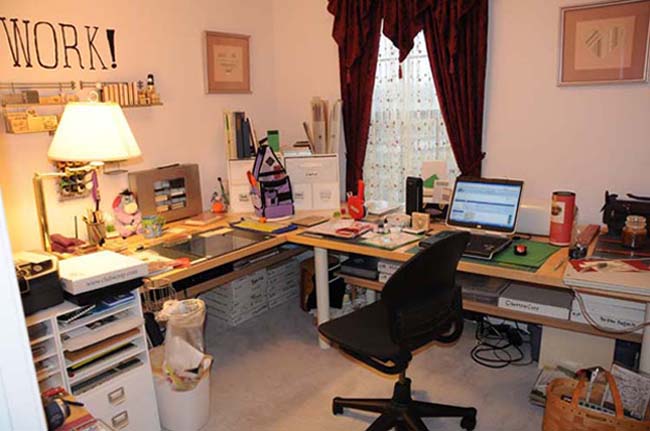
I looked at my studio and decided that I wasn't using the closet space effectively. I got a set of steel shelves, some plastic tubs and POOF!


A much more effective use of the space. And, I'll be able to get rid of a very large and awkward cabinet that most of the stuff fit into. I just need to find storage space for my iron and my Inkle loom.


Everyone has a professional steam iron and an Inkle loom, right?

Saturday, January 21, 2012

I am a PC

But I also own an i Pad2. At the moment, I'm restoring the apps that were lost when a file was corrupted in the midst of an upgrade. Sigh. The upgrade went through, but a long list of apps did not make it.

I invest time, not money into sprucing up my digital toys. I have paid for one app for my Kindle Fire. One. Every other app has been free. For the iPod touch, my cell phones (well, not the ringtones, but I don't do a lot of those) and so on.

I'll pay lots of money for a quality app. But I'm not interested in trying to run Office or Photoshop on my i Pad.

Friday, January 20, 2012

No Longer Shopping

Last year, I made a resolution to shop less. This year, I realized that I don't shop anymore. I got to the point where I looked at the new kits and I thought, "I've already got something a lot like that," and I didn't buy it. Then I stopped looking.

I'm not saying that I've got the worlds most complete stash. Far from it. But I've gotten enough of the classic kits that I prefer to work with and I've learned enough about Photoshop that I don't need to buy anything more to create a layout that is pleasing to me.

I create because I need to do things that please me.

Monday, November 21, 2011

I'm not Dead

But this new job is killing my free time.

Anyway, I was able to spend a little time watching a training video on using the pen tool. I'm going step by baby step, but I'm determined to grasp the concepts and become competent in using the pen tool.

The first step in learning how to use it is learning how to set it up. In the process, I'm learning what all the little symbols that appear and vanish next to the icon mean.

In early December, I'm hoping to get new glasses. The ones that I've got are not up to the task of reading all the little symbols without some squinting and straining.

Monday, August 29, 2011

A Thought

Storage is not organization. Nor is organization storage. You can put everything away and not know where anything is, and you can know where everything is when nothing is put away.

Me, I prefer to know where everything is when it is put away. Therefore, when I am working, I put things away instead of put them down. If I need a tool that I used ten minutes ago I don't have to search through the things scattered around my work surface, I simply reach to the location where I know that tool is stored.

Saturday, August 6, 2011

Tidy Up

I just spent a pleasant afternoon tidying up a lot of files that I'd downloaded and hadn't sorted out. Time spent doing that is not wasted. I can find the files that I want because I know where they are. I have a file system with clear labels that let me know what is inside the file. If you look at my studio, you'll realize that I label drawers.

I'm about to spend some time sorting through Hypatia, my Kindle. I've downloaded samples and haven't deleted them after I purchased the book. My directory of sample books is getting cluttered.

Saturday, July 23, 2011

PTotD

Tip # 130. The process for saving presets of different types, meaning shadows, styles, Brushes and so on, is functionally the same process. If you can save a style, you can save a Brush and so on. If you aren't paying attention, you'll save things that you didn't want to save included with the things that you did want to save.

I'm thinking of a kit that went up for sale and the designer had included a set of styles in her kit. But since she hadn't been paying attention, she'd saved a set of styles that included ones that were not for sale. She bought them from a different designer and hadn't meant to include them.

The trick is to select only the objects that you want to save in the Preset Manager. The lines around the different styles or Brushes or whatnot will be heavy if the item is selected. Use your Command or control click to select more than one. Shift click will work as well. Only the do you want to click on the save set button.

Don't forget to give your set a descriptive name when you save it!