Showing posts with label computer. Show all posts

Saturday, January 18, 2014

My Studio

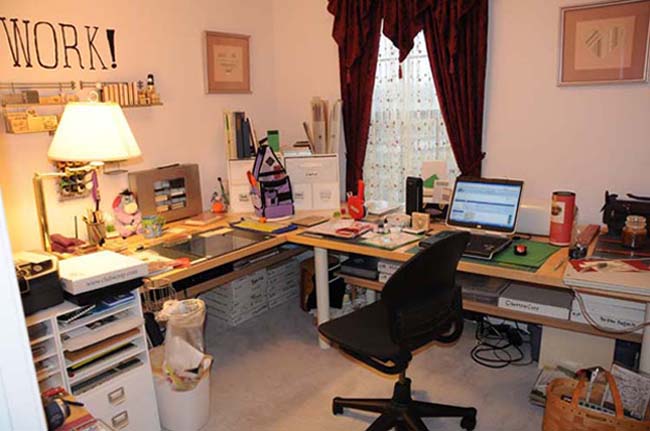
The image for this blog heading is my old studio in Virginia. My studio space in Florida doesn't photograph as well. I took over the living and dining room of this house and laid out my studio to have space for paper, computer, sewing, and embroidery. I ended up putting in a space for my grandson to work on his projects. Paper is the northeast corner, embroidery is the southeast corner, sewing is southwest, and reading/grandson space is the northwest corner. He gets the square coffee table and can sit on the floor.
There are five bookcases. There are crates, boxes, and tubs. There is storage under the paper crafting tables and under the cutting table. I have my grandmother's sewing cabinet, my mother's sewing cabinet, and my grandfather's curio cabinet. Storage, as they say, is non-trivial. There are also six tables for workspace, not counting the ironing board.

While ten people could not all work in here at once, there are ten separate work zones. Cutting, sewing, ironing, reading, kid, computer, embroidery, diecuts, paper and stamping/beading. I use lots of local lamps as the living room has no ceiling light. The dining room has the chandelier, that I got Bud to loop up high enough to walk under. Neither window gets a lot of direct sunlight. That's a Good Thing down here. Direct sunlight = hot. 

I put up a folding screen to block access from the butler's pantry and a dog gate to block access from the front hall. There are toxic things in my studio that would kill Jack if she were to get her teeth into them. Jack would not still live Some of them are stored well within her reach. Even my grandson is not allowed in if I am not in here with him.

Even with this incredible workspace, before I quit working, I didn't feel like making stuff very often. Now, I'm getting back to work in a big way. Each day I either make significant progress on a project or I finish something off. With all that, I have only  started my attack on three years of round tuits.

Wednesday, January 15, 2014

Computing

I did the update to Windows 8.1. Actually, I did it some time ago. This caused problems with my Cricut, as the application that I use to run it did not play in the same sandbox at all. I had a $200 Cricut shaped doorstop. But the folks at Provo Craft finally sent out an update and I was back in business. Is 8.1 better than 8.0? Meh. A couple of things that were nifty with a touch screen and a royal whirling pain in the butt with a tablet or mouse got adjusted. The power button got moved, but it still stumped my DSS when I challenged him to prove that he knew his way around the OS.

I've been working with Lightroom 4 a bit. I'm not sure if I like it. I need to dig through Photoshop CS6 and get it fine tuned to the way I'd like it to behave. I'm not too worried about getting that done. I've been working with Photoshop since Photoshop 6. It isn't rocket science.

Sunday, August 4, 2013

Configuration Process

I've been taking it much more slowly than I usually do when configuring a new computer or a rebuild. The list of applications I use has gotten longer but that's not slowing me down. I'm simply not trying to get everything done at once. I only installed a printer this morning. Today's goal is to get Lightroom installed. After all, that software is why I got a new computer in the first place.

Thursday, August 1, 2013

Another Computer?

Well, yes. When you can't update applications because your OS is too old, and you can't update the OS because the hardware is too old, you need a new computer. And I even got a new monitor. There's a chance I could run the old monitor, too. That would give me incredible screen real estate. In the scary realm, because my new monitor is 27". Plus the old flat panel? Yikes!

For now, I'm just installing applications that I want to have and I'm loading data. I finally have terrabytes of drive space on a single machine, with NO external hard drives. All of my music and all of my pictures in one location! Sort of. Eventually. Not counting local and remote backup copies. I AM a geek at heart. I have never lost data yet. Drives, yes. Data, no.

Folks are saying that they hate Windows 8. I dunno yet. There are a few things I'd rather it didn't do, but I can always change settings. A lot of things people are complaining about being hidden aren't in any different location than they always were. In some ways, I'm finding Windows 8 to be a cleaner interface.

Monday, April 29, 2013

Resolution

I'm not a computer geek for nothing. Ignore the 'Loading' screen. Press on with the re-installation of the software. Uncheck the pre-selected items that make no sense. Make sure the darned thing is plugged in and charging. Go away and do something else. Et voila! One functioning Gypsy.

Then I had a small cleaning fit and re organized a storage shelf. Or three. Not a big deal. I just made labels, alphebetized a set of books and put heavy stuff down low and lighter stuff higher up. 

Tuesday, May 22, 2012

Untouched = Not Updated

So, I finally opened up Lightroom after a long time away from my computer. Really, I shouldn't have. I have had to install at least two updates and reboot once. Eventually, I'll be able to print the two pictures that I wanted.

If I'd regularly used the application, I'd have been caught up with the updates and printing those two pics would be a snap. Nope. If you don't use it, you lose it and staying updated is no exception.

Saturday, January 21, 2012

I am a PC

But I also own an i Pad2. At the moment, I'm restoring the apps that were lost when a file was corrupted in the midst of an upgrade. Sigh. The upgrade went through, but a long list of apps did not make it.

I invest time, not money into sprucing up my digital toys. I have paid for one app for my Kindle Fire. One. Every other app has been free. For the iPod touch, my cell phones (well, not the ringtones, but I don't do a lot of those) and so on.

I'll pay lots of money for a quality app. But I'm not interested in trying to run Office or Photoshop on my i Pad.

Tuesday, April 19, 2011

Epson Printer!!!

I ordered a new Epson printer at Photoshop World and it arrived yesterday. I now have time to get it set up. I think I'll put it within actual USB cable reach of where I usually have my computer, so I can connect to it. I have to connect to my old Epson printer via sneaker-net. That's when you are wearing out sneakers walking back and forth carrying thumb drives or flash cards with pictures on them from the computer to the printer.

Saturday, February 26, 2011

Moving to a Medium Tablet

As soon as the budget allows, I'm getting a larger tablet. I use an Intuos 4 small and it simply does not work with the things that I want to do. There is a relationship (that can be changed) between the tablet and the screen. I can set the tablet so it only works for a portion of my screen. That only works for specific jobs. I use a dual monitor setup. Making the tablet active on a portion of one monitor leaves me with a lot of screen inactive.

There are also features on the Medium that are not available for the small. There are more buttons. The buttons have an LCD screen next to each button, so I can tell what functions I've assigned to each button. Right now, I don't use the buttons because I never remember which button is which. I have enough to remember already.

I've been experimenting with different settings for my pen. There are two buttons on the side of the standard pen, and I only regularly use the lower one. I can also set the eraser to perform a specific function when I tap it on the tablet, which I have not done yet. I'm thinking about setting it for a double-click.

The Intuos manual is extremely well written. The folks there know right brained folks and left brained folks and have created a manual that both types would be happy with. There is a lot of detail, explained in plain English. If you don't read the manual, you won't understand the features and won't get the full benefit of the tablet.

Friday, August 27, 2010

I Should Know Better

Every so often I forget that the average forum reader has very little expertise. They are capable and competent people, but they aren't subject matter experts. When I post a question on a forum, I'm usually asking something that the average person can't answer. I'm looking for information from a SME. There are a few SMEs on forums. A very few. Often, they are so tired of always answering questions that they don't bother any more.

I asked a question on a forum recently. The answers I got ignored the icon I use, which is a D300, and gave me some simple photography tips. And I do mean simple. I responded via PM. And I only PM when I'm pissed.

Tuesday, July 27, 2010

Digital Ink

I'm trying out a different nib for my Intuos 4 tablet. I'd been using the standard nib and now I'm using the flex nib. It's supposed to have a 'stickier' feel to it. I haven't noticed that it is higher friction, but I have noticed that the tap of a click action feels more like tapping a tennis ball, compared to the tap of a ball point on paper of the standard nib. No nib is going to feel like one of my fountain pens, though. Drat.

Friday, July 23, 2010

Pen Angle

Since I use a tablet instead of a mouse, I come across tablet issues every now and then that surprise me. I was using the Cricut Design Studio software, which is a simple shape manipulation application.

I had to click on the outline to select a shape that I wanted to move. I could not do it. I felt foolish. I had precision, I had control, why couldn't I click on that darned outline?

It turns out that the Wacom pen angle confuses the Cricut Design Software a bit. In order to select the outline of a shape, I must hold the pen so it is at right angles to the tablet, I can't tilt it in my hand. The slightest tilt causes the problem, the pen has to be perfectly upright.

Wednesday, June 30, 2010

Deleting Duplicates and Naming Conventions

I had one of those 'Misc' folders in my photo files. I had carefully saved photos from several different computers, from zip files, from camera cards, and CDs into this one folder. I finally took the time to go through it one photo at a time and sort them out properly. I had more duplicate files than I'd realized. Better that than to know I have a photo and not be able to find it. Many of my early digital photos are very small. While I deleted a lot of duplicates, I only deleted about 1 GB of data.

Since I changed the organization of my photos, I'm going to hook up my second EHD and make sure that my local data backup is up to date. My Backblaze backup will automatically update itself. With my non FIOS connection (can you hear me whining?) it won't be quick, but it is automatic.

I use a date and description system for sorting my pictures. Before 2005, they are sorted by subject and sometimes also by date. Pictures after 2005 are sorted by year, with a separate folder for each event during that year. For example, inside the '2008 Photos' folder, there is a '2-14-08 Valentines' sub-folder. I store the pictures with the alphanumeric name the camera assigns. I'll append to the alphanumeric if I edit the photo, so I won't confuse the original DSC6442.jpg with DSC6442adjusted.jpg. I'll re-name the photo to 'Roses for Valentines 2008.jpg' only if I share it.

Tuesday, May 18, 2010

Blog Editing

I had created a blog background to use on this blog and then I did something goofy and it wasn't the right size for my own computer screen resolution. I created a different blog background and then I didn't correct the link I was using to get it to load into my blog. Silly me.

Just now, I did the edits and the background looks OK on my own screen. However, in order to make sure that I had done the correct edit, I had to turn myself into a Java encoder for HTML. Let's skip all the geeky technicalities and just say that I had to do by hand what a competent java tech could do in seconds. Sometimes it is really annoying having some of the understanding and none of the tools.

To avoid repeating my error, I'm going to delete the bad background, so I don't accidentally use it anywhere else. I don't often delete files. Drive space is so cheap.

Saturday, May 15, 2010

20 Years!

I just realized that I've been on-line for 20 years. Not that on-line is the same, but I've been speaking to folks who are distant, through the magic of my computer for 20 years. Wow.

I started on a luggable computer with a 7" screen and 5.25" floppy drives that you had to swap out to boot the machine up. The screen was bright green on a black background. I could type, but pictures? Not so much. Though I did play 'Loom' when it came out. I bought a bootleg copy in Hong Kong. There wasn't an alternative.

Anyway, I've come a long way from the Zenith laptop that we upgraded to from the I-can't-remember-the-brand luggable. That was a one color screen, too, but we used screensavers. Remember the guy mowing the lawn? No matter what I do, no matter how careful, what machine I get and so on, I end up getting a new computer about every five years. Sometimes more frequently, but five years is a pretty good average. My current laptop turned two this month. The warranty is good for three years after purchase. I might even renew it.

Tuesday, April 13, 2010

Raid!

RAID actually stands for Redundant Array of Inexpensive Drives, and means that instead of writing the file once to one drive, my computer writes to more than one drive. I can't have RAID if I only have one hard drive. I must have more than one. And if I have a second drive hooked up to my computer, but I have to copy files from one drive to another, even if it is automatic to make the copy, it isn't really RAID. The goal of RAID is for the action to happen as the file is being written to the drive.

There are several different types of RAID. I can have RAID set up so my computer is writing part of a file to one drive and part of the file to a different drive. Like having two printers, one printing the odd-numbered pages and one printing the even numbered pages. My print job will finish faster, but I still only end up with one copy. That is called RAID 0 (zero).

In RAID 1, my computer writes the data twice, once to each of two drives. If one drive fails, the data is sitting on the other drive. If both drives fail, I lose data. RAID 1 is also called mirroring. It's actually slower than writing to only one drive, even though my computer is writing to both drives at the same time.

Then there is RAID 5. It doesn't mean that I've got five drives. It means that I have at least three and I could have a whole lot more than three. My computer writes a part of each file to different drives and it throws in some fancy math as well. If I have three drives set up as RAID 5, I'll have 1/3 of the file on the first drive along with a bit of fancy math, 1/3 on the second and that fancy math and 1/3 of the file will be on the third drive with the fancy mats as well. The fancy math allows what is on one drive to be re-created. Say a drive fails. Drat! I go out and buy a new one. I unplug the dead drive and plug in the replacement drive. I tell my computer to get to work and regenerate the lost data. Poof! I have not lost any data, even though a drive failed! Wow. However, if I lose a second drive before I replace and regenerate the first failed drive, I lose all of my data. RAID 5 can be fast.

In between RAID 1 and RAID 5 are several other types of RAID. Some are really good at making computers read files faster, some make computers write files faster. It is possible to combine different types of RAID for even greater redundancy. For example, it is possible to combine RAID 1 and RAID 5. It won't be fast, but the data will be safe.

For most home users, RAID 1, or mirroring, is plenty. While it is slower, it isn't cripplingly slow. It's easy to set up and easy to understand. The most important thing to remember is that it is a mirror. The drives should be the same size, or I will end up wasting space on the larger drive.
Thursday, March 18, 2010

Mouse vs. Tablet

I had to hook up my mouse again for some convenience type task as I hauled my laptop thither and yon and did not want to carry the tablet.

Wow.

The mouse is NOT as accurate as the tablet. I hadn't realized how used to absolute accuracy I had gotten until I didn't have it any more and I kept expecting it. I'd move the mouse and the cursor might move and it might not. And sometimes it would move a lot and sometimes it would move much at all. Now, this mouse wasn't broken and I wasn't using it on some oddball surface, like shag carpet. It simply was not as accurate as the tablet. I'm never going back. Ever. Even for a short trip, I'll haul the tablet.

Tuesday, February 23, 2010

Waahhh!!!

The video card died in my laptop. I have a brick until the Dell Tech can schedule to come out and replace it. I'm not happy owning a brick. Happily, my Wonderful Husband had a computer that he is willing to let me use. But it is just not the same. The same applications aren't loaded, the configuration aren't the same and so on.

Drat. I want the tech to call tomorrow and repair my laptop yesterday. But I'm never happy when my laptop is down. That's why I have on-site service.

Tuesday, December 15, 2009

Configurations

I use a two monitor configuration when I am on my laptop at home. When I stay at my MIL's in Florida, I haven't got the second monitor. I'm debating the merit of taking it with me when I head south on Friday. My laptop and monitor will fit on the table that I have set up in the Florida room down there. But the house will be full of family, I won't have that much time to scrap and I'll haul it back up north before New Year's.

As much as I love my dual monitor set up, December is not the right time to haul it down to Florida.

Thursday, November 19, 2009

The Nature of the Beast

A lady was complaining that PS7 was eating up her RAM. She said it was using up 'like 1.5 GB' and wanted to know what to do. She was considering downgrading to some other application. I answered her as politely as I could, saying that you can configure Photoshop to use less RAM, or a smaller percentage of your RAM, but then it would run more slowly. Mine is the only response she has gotten.

What she's done is the same as buying a car with a huge, powerful engine and then complaining because it isn't very fuel efficient, or getting a puppy and complaining that it needs to be fed and walked. There are some things that are the nature of the beast. Complaining about the negatives won't get me much sympathy. If I want to dance, I have to pay the band.